Stop Size Survival Table by Session
A trader picks a stop size and wonders how often the market's normal bar range is already bigger than it. This script puts a small table on the chart that counts, for four stop sizes, how many recent closed bars in each session had a high to low range larger than the stop.
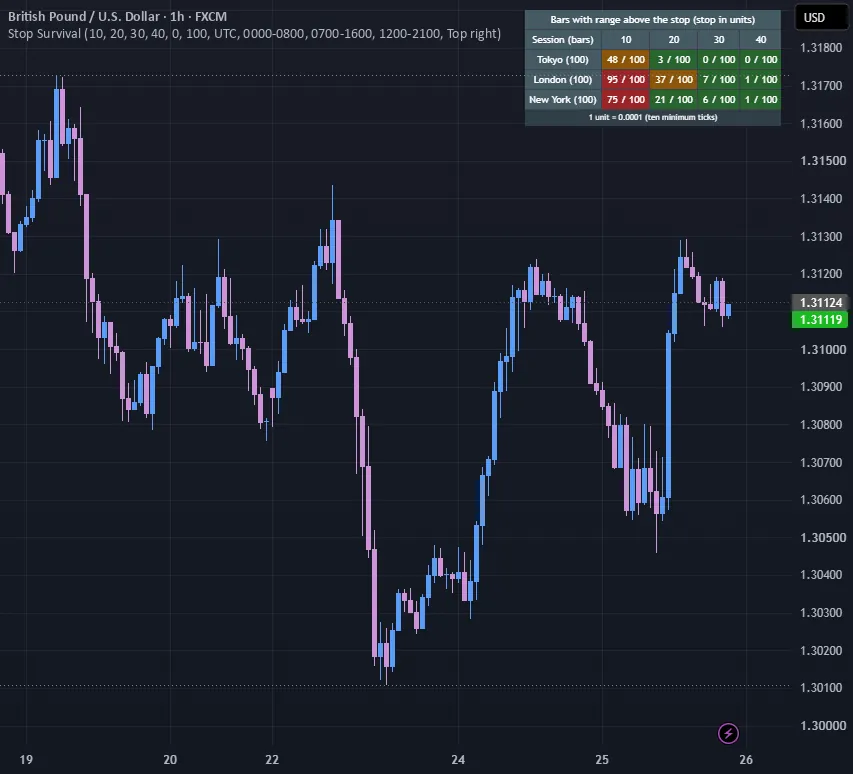
What it shows
- A table in a corner of the chart, with one row each for Tokyo, London and New York.
- Four columns, one per stop size. Each cell reads "hits / total", for example 37 / 100. A session with no stored bars reads "no bars".
- The number in brackets next to each session name is how many bars are stored for that session right now.
- Cell color moves from green to amber to red as the share of bars above the stop grows. Green is under a third, amber is a third up to under two thirds, and red is two thirds or more.
- A last row stating how big one unit is in price terms and where that size came from.
- On a daily or higher timeframe the table shows a short message asking for an intraday chart.
How it works
Every bar is checked against three session windows, read in the time zone chosen in Session time zone. When a bar closes inside a window, its range (high minus low) is stored for that session. Each session keeps its most recent stored bars, up to the Lookback bars per session input. A stop size in units is multiplied by the unit size to get a price distance. The table counts the stored bars whose range is larger than that distance. Windows may overlap, and a bar inside two windows is counted in both.
Inputs and defaults
The four stop inputs begin at ten units and rise in equal steps. Unit size starts at 0, which means auto. On forex symbols one auto unit is ten minimum ticks, which is one pip on most pairs. On every other market one auto unit is 0.01 percent of the latest close. Type a price distance into Unit size to replace the auto value. Lookback bars per session starts at 100 and accepts values from 5 to 500. Session time zone starts at UTC and offers a short list of zones. The default windows are Tokyo from 0000 to 0800, London from 0700 to 1600 and New York from 1200 to 2100. Table position starts at Top right.
How to use it
- Open a 1 hour chart of a forex pair, a futures contract or a crypto pair.
- Type the four stop sizes you are weighing into Stop 1 to Stop 4.
- Check the last table row. If the unit size is not the distance you think in, type your own into Unit size.
- Adjust the session windows and Session time zone if your market keeps different hours.
- Read across a row to see how the counts change as the stop gets wider, and down a column to compare sessions.
Why it is different
The grid is built around the stop size you are actually considering, with each session counted on its own. You get a plain count for each session and stop size, so the quiet and busy hours stay apart.
Limits
- It needs an intraday timeframe and is designed for a 1 hour chart. On other intraday timeframes the same rules apply and each count is a count of bars.
- A bar range says how far price travelled inside that bar. It does not say which way, or whether any stop would have been touched in a real trade.
- Only the bars the chart has loaded are counted. A session may hold fewer than the lookback, and the bracket number shows how many. A market that is closed during a window shows no bars for it.
- The bar still forming is not counted until it closes, so the table only changes when a bar closes.
- The auto unit on non forex markets follows the latest close, so it shifts a little as price moves. Some forex feeds quote four decimals, where ten minimum ticks is ten pips, so check the last table row.
- Sessions are fixed clock windows. With UTC they do not follow daylight saving changes. With a local time zone they follow that clock, and bars in the hour of a clock change may land in a different window.
- It draws on the chart only. It places no orders and is not advice about any trade.