Prop Account Fail Line
A funded or evaluation account fails at a dollar figure, and a chart only shows price. This script puts the failing price on the chart for the contract you hold, so you can see where the account ends before the trade gets there.
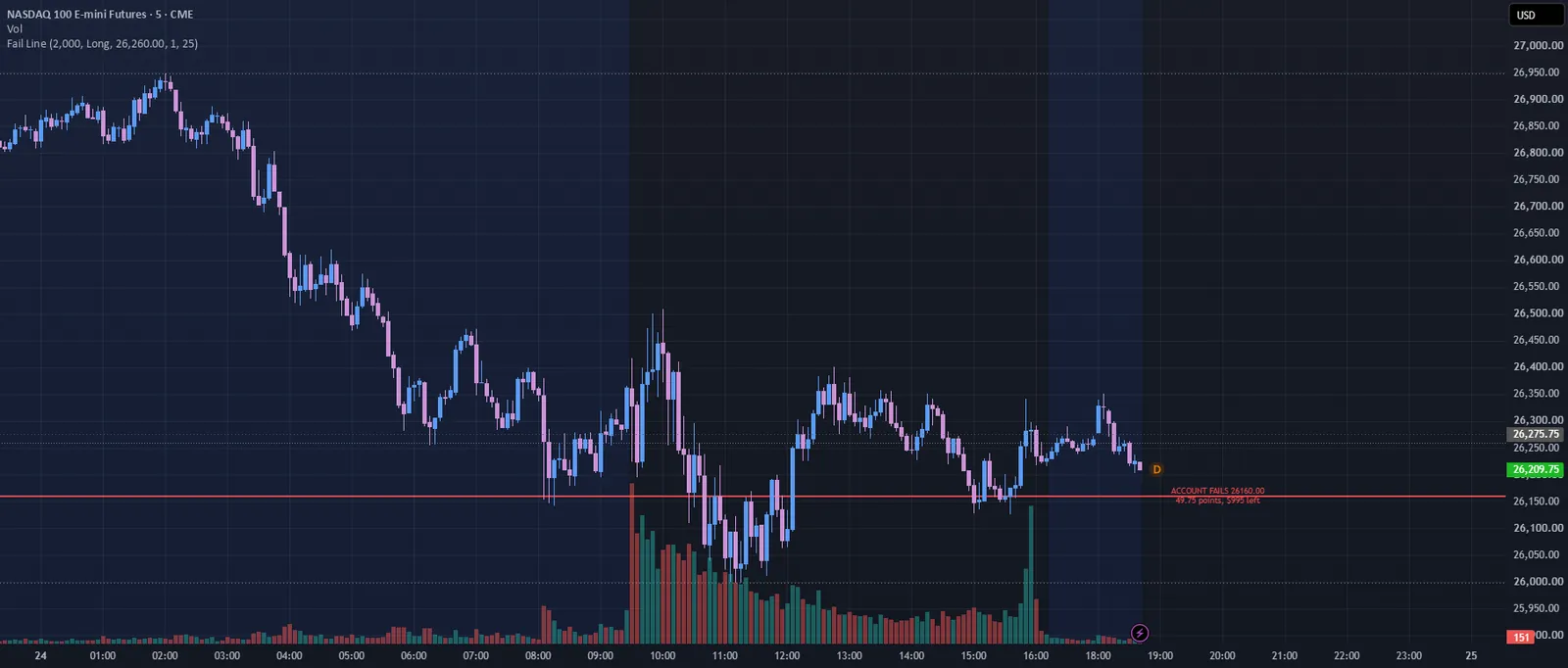
What it shows
- A solid red line at the price where your drawdown room runs out, labelled ACCOUNT FAILS with the price.
- A dotted line at your entry.
- Under the label, the points and dollars left between the last price and the fail line.
- When the dollars left drop to your warning share of the room, the label turns solid red, and the "Fail line warning" alert fires.
How it works
The script reads the contract's point value from the symbol, so a point on NQ counts as 20 dollars and a point on ES counts as 50. It divides your drawdown room by the point value times your contracts, and places the line that many points from your entry: below it for a long, above it for a short.
How to use it
- Open your firm's dashboard and read how many dollars the balance can still fall before the account fails.
- Enter that figure as "Drawdown room left", then set your position, entry price and contracts.
- Set the warning share. At 25 percent, the warning fires when a quarter of the room is left.
Why it is different
It starts from the dollar limit your firm enforces and turns it into a price for the exact contract and size on your chart. Because it reads the point value from the symbol, it works on any futures contract without a point value setting.
Limits
- The room is taken as you enter it. If your firm trails the drawdown during the day, update the figure as it trails.
- It does not know your open profit on other positions, commissions or fees.
- It draws on the chart only. It places no orders and is not advice about any trade.